What browser am I using?
is fantastic web app that will make it easy to know what browser your client or anybody is using.
You're using Firefox 27.
Share this with your support team!
Browser details
This information may help support representatives resolve any issues you're experiencing with their website.
Operating system
Windows 7
Cookies enabled
Yes
Flash version
12.0.0
Java version
1.7.0_09
Browser size
1349 x 664
Screen size
1366 x 768
Color depth
24 bit
Your full user agent string is:
Mozilla/5.0 (Windows NT 6.1; WOW64; rv:27.0) Gecko/20100101 Firefox/27.0
A fantastic and complete set of Photoshop templates for device assets
by Blair Culbreth. It includes favicons, Apple touch icons, startup
images for iPads and iPhones old and new, and Windows tiles for IE10 and
IE11.
Ionic offers a library of mobile-optimized HTML, CSS and JS
components for building highly interactive apps. It is built with Sass
and optimized for AngularJS. It's in alpha and it looks like a very
promising framework for developing hybrid mobile apps in HTML5.
Whether show semi-transparent overlay behind the editor in fullscreen mode. (true/false)
placeholder
Show placeholder on the editor. (string)
transition
The transition effect while switching fullscreen mode, by default it is 'fade'. ('fade', 'slide-in')
expandOnFocus
When set to true, the fullscreen mode will be triggered on focus. (true/false)
maxWidth
Maximum width for fullscreen editor. (number)
maxHeight
Maximum height for fullscreen editor. (number)
onExpand
Expand event will be triggered when editor the goes to fullscreen mode. (function)
onMinimize
Minimize event will be triggered when the editor goes to inline mode. (function)
Public Methods
To trigger a public method of the plugin, you can simply call;
$('#fseditor').fseditor('method');
expand
Triggers fullscreen mode.
minimize
Minimize the fullscreen mode. (unless it's not expanded)
destroy
Removes the plugin completely and brings the native textfield back.
Credits
This plugin was created by Burak Son (@burakson). Feel free to open a ticket on issue tracker regarding any ideas/bug report. Contribution would also be appreciated!
Learn how to get started with HTML5 game development from this guide by Austin Hallock and Robert Nyman.
Most of the audience here already sees the value in HTML5, but I want
to re-iterate why you should be building an HTML5 game. If you are just
targeting iOS for your game, write the game in Objective-C, the cons
outweigh the benefits in that scenario… but if you want to build a game that works on a multitude of platforms, HTML5 is the way to go.
Cross-Platform
One of the more obvious advantages of HTML5 for games is that the
games will work on any modern device. Yes, you will have to put extra
thought into how your game will respond to various screen sizes and
input types, and yes, you might have to do a bit of ‘personalization’ in
the code per platform (the main inhibitor being audio); but it’s far
better than the alternative of completely porting the game each time.
I see too many games that don’t work on mobile and tablets, and in most instances that really is a huge mistake to make when developing your game – keep mobile in mind when developing your HTML5 game!
Unique Distribution
Most HTML5 games that have been developed to this point are built in
the same manner as Flash and native mobile games. To some extent this
makes sense, but what’s overlooked is the actual benefits The Web as a
platform adds. It’s like if an iOS developer were to build a game that
doesn’t take advantage of how touch is different from a mouse – or if
Doodle Jump was built with arrow keys at the bottom of the screen
instead of using the device’s accelerator.
It’s so easy to fall into the mindset of doing what has worked in the
past, but that stifles innovation. It’s a trap I’ve fallen into –
trying to 100% emulate what has been successful on iOS, Android, and
Flash – and it wasn’t until chatting with former Mozillian Rob Hawkes
before I fully realized it. While emulating what worked in the past is
necessary to an extent, The Open Web is a different vehicle for games,
and innovation can only happen when taking a risk and trying something
new.
Distribution for HTML5 games is often thought of as a weakness, but
that’s just because we’ve been looking at it in the same sense as native
mobile games, where a marketplace is the only way to
find games. With HTML5 games you have the incredible powerful hyperlink.
Links can so easily be distributed across the web and mobile devices
(think of how many links you click in the Facebook and Twitter apps),
and it certainly should not just be limited to the main page for the
game. The technology is there to be able to link to your game and do
more interesting things like jump to a specific point in a game, try to
beat a friend’s score, or play real-time against that friend – use it to
your advantage!
Take a good look at was has worked for the virality of websites and apply those same principles to your games.
Quicker Development Process
No waiting for compilation, updates and debugging in real-time, and
once the game is done, you can push out the update immediately.
Choosing a Game Engine
Game engines are just one more level of abstraction that take care of
a few of the more tedious tasks of game development. Most take care of
asset loading, input, physics, audio, sprite maps and animation, but
they vary quite a bit. Some engines are pretty barebones, while some (ImpactJS for example) go as far as including a 2D level editor and debug tools.
Decide Whether or Not You Need a Game Engine
This is largely a personal decision. Game Engines will almost always
reduce the time it takes for you to create a fully-functional game, but I
know some folks just like the process of building everything from the
ground up so they can better understand every component of the game.
For simple games, it really isn’t difficult to build from scratch
(assuming you have a JavaScript background and understand how games
work). Slime Volley (source)
for example was built without having a game engine, and none of the
components were rocket science. Of course, Slime Volley is a very basic
game, building an RPG from the ground up would likely lead to more hair
pulling.
Choosing Between a “Game Engine” and a “Game Maker”
Most of the typical audience of Mozilla Hacks are probably going to
lean toward using a game engine or building from scratch, but there is
also the alternative of using a “Game Maker” like Construct 2.
Using a Game Maker means you won’t actually write in JavaScript;
instead, you create code-like events in the editor. It’s a trade of
ease-of-use and quickness to prototype/develop vs customization and
control over the end result. I’ve seen some very impressive games built
with either, but as a developer-type, I tend to favor writing from
scratch / using an engine.
Finding the Right Game Engine / Game Maker for you
There are so many HTML5 game engines out there, which in part is a
good thing, but can also be a bad thing since a large percentage have
either already stopped being maintained, or will soon stop being
maintained. You definitely want to pick an engine that will continually
be updated and improved over the years to come.
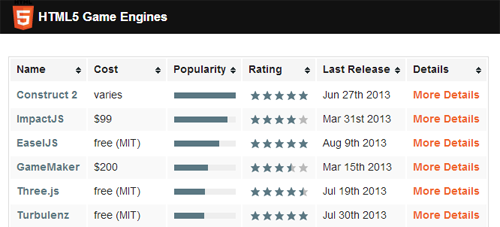
HTML5GameEngine.com is a
great place to start your search because the hundreds of game engines
are narrowed down to about 20 that are established, actively maintained,
and have actual games being developed with them.
For a more complete list of engines (meaning there can be some junk to sift through), this list on GitHub is your best bet.
Learning Tools
If you’re going with a game engine, typically their site is the best resource with tutorials and documentation.
Technical Tutorials
jsGameWiki is full of links to technical tutorials and resources.
No Tears Guide to HTML5 Games is relatively old (2.5 years), but still is a very good learning tool if you’re not using a game engine.
Game Design Tutorials
With game development, the technical aspect isn’t everything – what’s more important is that the game actually be fun. Below are a few places to start when learning about game mechanics.
Full disclosure here: I am a co-founder at Clay.io.
Making a game function is just part of the equation. You also want
players to play longer, come back, tell their friends about it, and
maybe even buy something. Common elements in games that focus on these
areas are features like user accounts, high scores, achievements, social
integration, and in-game payments. On the surface most are typically
easy enough to implement, but there are often many cross-platform issues
and intricacies that are overlooked. There is also value in having a
central service running these across many games – for example, players
genuinely care about achievements on Xbox Live because Gamerscore
matters to them.
Clay.io – user accounts, high scores, achievements, in-game payments, analytics, distribution, and more.
CocoonJS – Improves HTML5 game performance on iOS and Android with an accelerated canvas bound to OpenGL ES.
Motivation
Regardless of what you’re building, extra motivation is always
helpful. For games, that motivation often comes from surrounding
yourself with others who are in the same boat as you – working on games.
js13kGames is a competition that is currently taking place at the
time of this writing. You have until September 13th, 2013 to develop an
HTML5 game that, when compressed, is less than 13kb.
Clay.io (full disclosure, I am a founder) runs an annual HTML5 game
development competition for students. Last year was the first year and
we had over 70 games submitted. The next competition is planned for February / March 2014.
One Game a Month isn’t so much a competition as it is an
accountability tool. This isn’t restricted to HTML5 games, but many of
the participants work with HTML5. The goal is to crank out one game
every month. I wouldn’t recommend this long-term since one month is too
short of a time to create a great game, but it’s good when learning to force yourself to develop and finish simple games.
HTML5GameDevs has quickly become the most active community of HTML5
game developers. Most folks are very friendly and willing to help with
any issues you run into.
#BBG is the go-to IRC channel for HTML5 games – you’ll even find quite a few Mozillians hanging around.
How to Make Money
In-Game Purchases
In-game payments, in my opinion, are the way to go for HTML5 game in the long-term. For now, most HTML5 games don’t have enough quality content, nor the game mechanics in place to get player purchasing items.
This is the revenue model with the highest potential, but it’s also
the most difficult to achieve by far – not technically, but having the
right game. I’d say the best way to learn how to properly monetize your
game in this aspect is to take a look at games that do it really well on
Flash and Mobile – games from King.com and Zynga typically have this
nailed down pretty well. There’s also some good reading material, like The Top F2P Monetization Tricks on Gamasutra.
Licensing
Where we’re at right now with HTML5 games, licensing games is the
strongest, most consistent way to make money – if and only if your game
works well on mobile devices.
There are countless “Flash Game Portals” that receive organic mobile
traffic, but can’t monetize it with the Flash games they have. Their
solution is to go out and find HTML5 games to buy non-exclusive licenses
(the right to put the game on their site, often making small
adjustments) to offer their mobile visitors.
Typically non-exclusive HTML5 game licenses (meaning you can sell to
more than one site) go for $500-$1,000 depending on the game and
publisher. Some publishers will do a revenue share model instead where
you’ll get a 40-50% share on any advertising revenue, but no up-front
money. Licensing is the safest way to make money right now, but the cap is limited
– the most you’re going to make with a single game is in the
$5,000-$6,000 range, but it is easier to hit that mark than it is with
in-game payments or advertising.
Advertising
Advertising is the middle-ground between in-game payments and
licensing. It’s easier than in-game payments to make money and with a
higher potential cap than licensing (but probably less than in-game
payments). It’s easy enough to implement ads: just pick your ad network
of choice (be wary of Adsense’s strict terms) and implement them either
surrounding the game, or at various stopping points.
The commonly used ad networks are LeadBolt for mobile and CPMStar for desktop. You can also use Clay.io
which makes it a bit easier to implement advertising, and tries to
maximize the revenue by using different ad networks depending on the
device used and other factors.
Distribution
The final stage in a game’s development is distribution. The game is
done, now you want people playing the game! Fortunately, with HTML5
there are plenty of places to have your game (many of which often go
unused).
More and more marketplaces these days are accepting HTML5 games
as-is. Each has their own requirements (Facebook requires SSL, most
require a differently formatted manifest file, etc…), but the time it
takes to get into each is typically less than 30 minutes. If you want to
reduce that even more, Clay.io helps auto-generate the manifest files
and promotional image assets you’ll need (as well as takes care of the
SSL requirement) – documentation on that here.
Some marketplaces you’ll need to have a native wrapper for your game –
primarily the iOS App Store and Google Play. A wrapper like PhoneGap is
one option, but the native webviews have pretty terrible JavaScript
engines, so for now you’re better off with tools like CocoonJS and Ejecta.
source: https://hacks.mozilla.org/2013/09/getting-started-with-html5-game-development/
Animo.js is a really useful tool for managing CSS animations. It allows
to control the time and sequence of firing animations and more. Made by
Daniel Raftery.
Stack animations, create cross-browser blurring, set callbacks on animation completion, make magic.
CSS animations are phenomenal and offer numerous advantages over
JavaScript powered animations. First, they're hardware accelerated,
which sometimes hard to notice on a desktop but is unbelievably present
when viewing on a mobile browser. Second, I personally feel it's much
easier to visualize and write the animation/transition in CSS using
keyframes.
The problem with CSS alone is that they're usually fired on page
load or a hover event, and you can't stack animations or trigger another
when one has completed. That's where JavaScript and animo come in. You
can easily stack animations to fire one after another, specify callbacks
for the completion of an animation, or simply fire animations on any
event or at any moment you please.
source: http://labs.bigroomstudios.com/libraries/animo-js





 RSS Feed
 Twitter
 Facebook